Use the visual flow to understand preparation, Android permission, installation, and account setup.
How to Install WhatsApp Aero APK on Android
Installing WhatsApp Aero APK on an Android device is a simple process, but it requires following a few important steps to ensure proper setup and avoid installation errors. Since WhatsApp Aero is not available on the Google Play Store, users need to manually install the APK file on their device.
This guide explains everything step-by-step, including preparation, installation, and troubleshooting common issues.
Before You Install WhatsApp Aero
Before installing WhatsApp Aero APK, you should prepare your device to avoid errors during installation.
Backup Your WhatsApp Data
If you are switching from official WhatsApp or another mod, it is strongly recommended to back up your chats.
You can do this by:
- Opening WhatsApp
- Going to Settings
- Selecting Chats
- Clicking Chat Backup
This ensures that your messages, media, and chat history are not lost during installation.
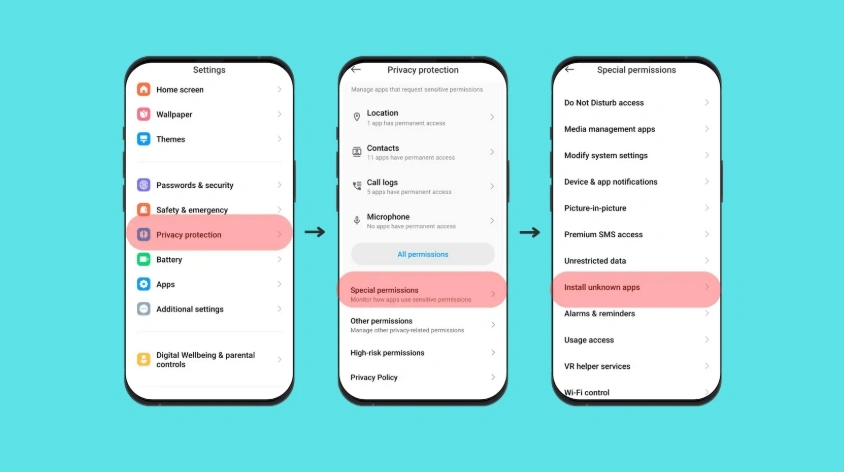
Enable Unknown Sources
Since WhatsApp Aero is not from the Play Store, Android blocks installation by default.
To enable it:
- Go to Settings
- Tap Security or Privacy
- Find “Install Unknown Apps”
- Allow permission for your browser or file manager
Once enabled, your device will allow APK installation.
Step-by-Step Installation Guide
Follow these steps carefully to install WhatsApp Aero APK on your Android device.
Step 1Download the APK File
First, download the latest WhatsApp Aero APK from a trusted source.
Make sure:
- The file is fully downloaded
- It is the latest version
- The file is not corrupted
Step 2Locate the File
After downloading, open your file manager and go to the Downloads folder.
You should see a file named something like:
WhatsApp Aero APK
Step 3Start Installation
Tap on the APK file to begin installation.
Your device may ask for confirmation. Click “Install” to proceed.
The installation process usually takes a few seconds.
Step 4Wait for Installation to Complete
Once installation is complete, you will see two options:
- Open
- Done
Tap “Open” to launch the app immediately.
Step 5Verify Your Phone Number
After opening WhatsApp Aero:
- Enter your phone number
- Receive verification code
- Confirm your account
This step is required just like the official WhatsApp setup.
Step 6Restore Backup (Optional)
If you created a backup earlier, WhatsApp Aero will detect it.
You can restore:
- Messages
- Images
- Chat history
This helps you continue your conversations seamlessly.
Common Installation Problems
Some users may face issues during installation. Below are the most common problems and solutions.
App Not Installed Error
This usually happens due to:
- Corrupted APK file
- Incompatible Android version
- Not enough storage
Solution:
- Re-download APK
- Free up storage space
- Ensure Android 7.0 or above
Parse Error
If you see a parsing error:
- The file may be incomplete
- Or not downloaded properly
Solution:
- Download again from a reliable source
- Do not interrupt download process
Installation Blocked
If installation is blocked:
- Enable “Install Unknown Apps”
- Allow permission for file manager
Verification Failed
If you cannot verify number:
- Check internet connection
- Wait a few minutes and retry
- Ensure SIM is active
Is Installation Safe?
Installing WhatsApp Aero APK is generally safe if downloaded from trusted sources. However, since it is a modified application, users should always take precautions.
Safety tips:
- Download from reliable websites only
- Avoid unknown APK sources
- Keep antivirus enabled
- Always use updated versions
Why Proper Installation Matters
Correct installation ensures:
- Stable performance
- No crashes or bugs
- Full feature access
- Better compatibility
Incorrect installation may cause app errors or login issues.
Key Features After Installation
Once installed successfully, users can enjoy:
- Advanced privacy controls
- Custom themes and UI changes
- Anti-delete messages
- Chat lock features
- Enhanced media sharing
These features make WhatsApp Aero more flexible than the official app.
Summary
Installing WhatsApp Aero APK is a straightforward process if you follow the correct steps. The most important parts are enabling unknown sources, downloading the correct APK file, and completing setup carefully.
Once installed, users can enjoy a fully customized messaging experience with enhanced privacy and personalization features.